 Maymoune
A chatbot in your mobile app that answers with your own content
A chatbot that reads your pages and answers customers at any hour, with links to your treatments, products or events. Settings, examples, and a 30-day free trial.
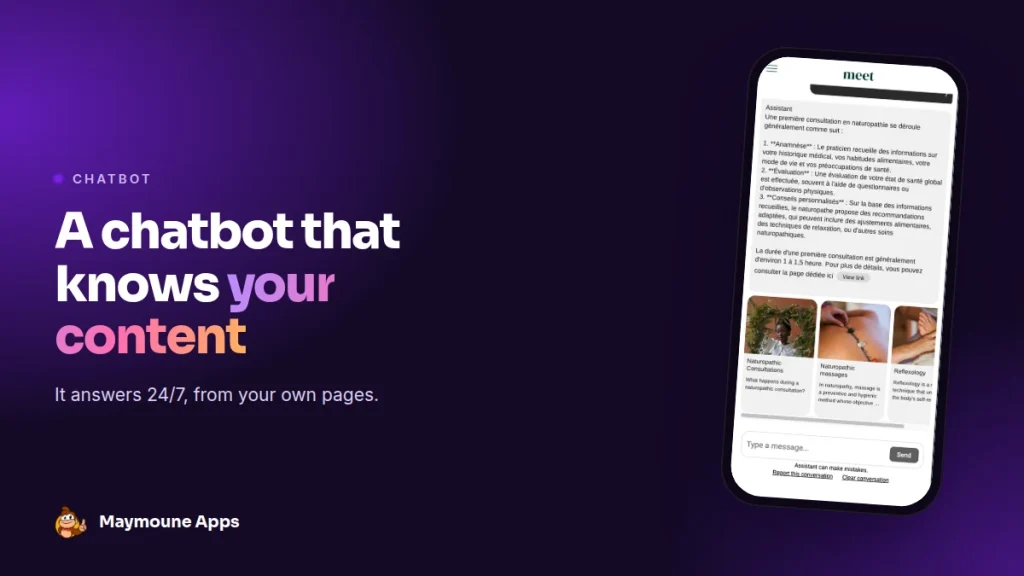
A chatbot in your app answers your customers at any hour, using your own content: your treatments, products, events and addresses. Every answer links to the right page. It’s an optional extension, free to try for 30 days.
Tuesday, 11 p.m. A customer is torn between two treatments. She won’t call at that hour, and she won’t read all your pages. She asks her question in the app: “What happens during a first appointment?”. The answer arrives in seconds, with the link to the treatment page.
Here I show you how this chatbot works, with a real conversation in our demo.
A chatbot that reads your own pages
A classic chatbot answers with what it knows about the world. This one answers with what’s in your app. It reads your posts, events and places, then relies on them to write a clear answer, in the customer’s language.
Under each answer, clickable cards show the pages used. The customer checks, reads on, and books.
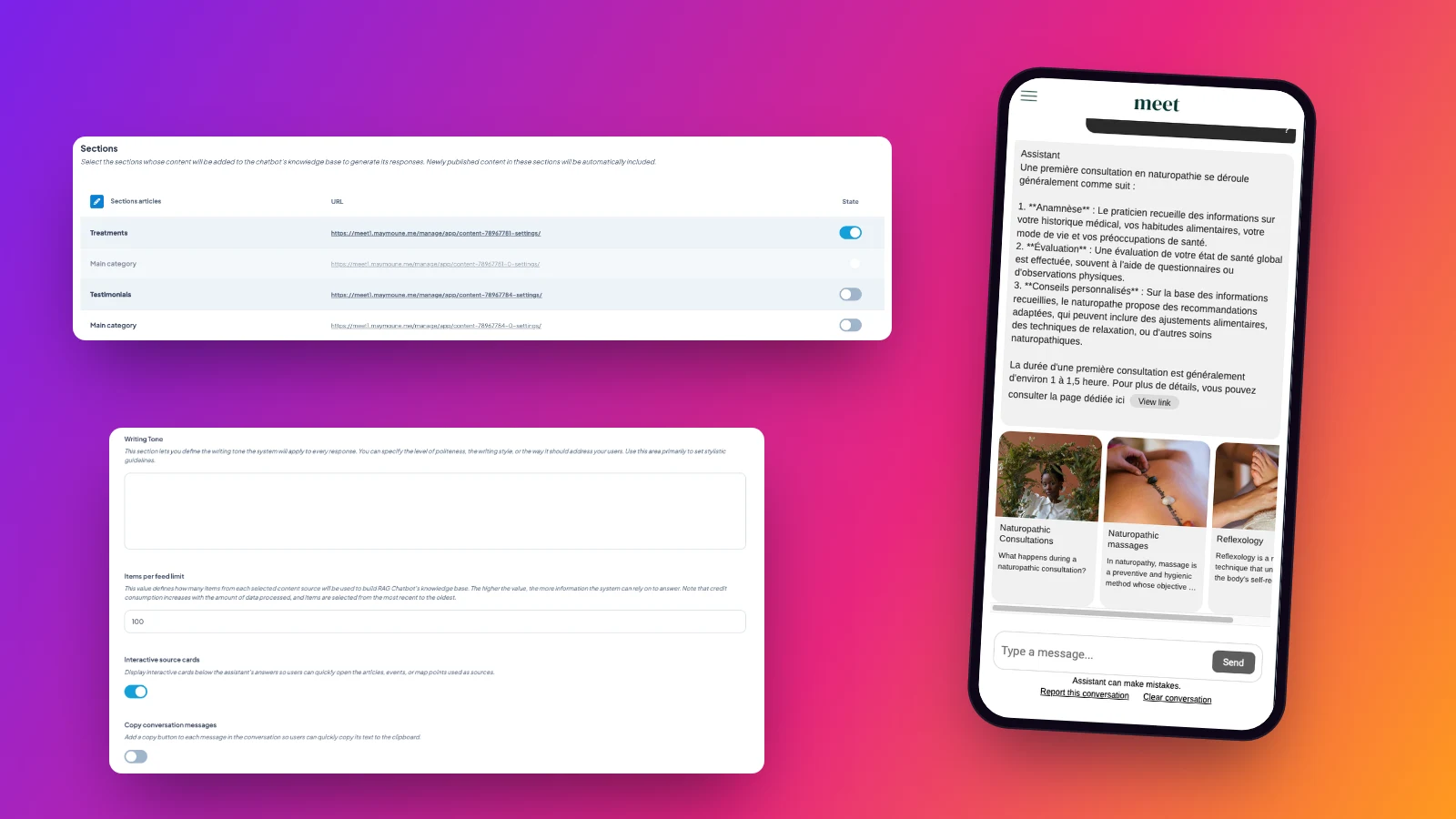
What you set up
- Sections to read: you choose which ones it relies on, for example your treatments but not your testimonials.
- Connected content: posts written in the app, but also your connected WordPress or RSS feeds.
- Updates: every new item published in these sections is added automatically.
- Tone: warm, formal, casual or polite, you write it in your own words.
- Source cards: shown or hidden under each answer.
- Look: colours, fonts and chatbot image, so it matches your app.
- AI model: faster or more precise, depending on your needs.
Answers based on the customer’s status
If your app sells a subscription, the chatbot takes it into account. A subscriber gets answers drawn from all your content, free and paid. A visitor, only free content. You can even reserve the chatbot for subscribers, as an extra perk. See the article on the members area.
Who it helps
- A salon or a practice: how a treatment goes, how long it lasts, how to book.
- A tourist office: where to eat tonight, what to visit with kids, which event this weekend.
- A store: which size to pick, which products for a gift.
- A school or a town council: opening hours, procedures, key dates.
Get it ready
- Complete your pages: the chatbot only answers well on what’s written.
- Leave out sections that shouldn’t be used as answers, such as customer reviews.
- Ask it ten frequent questions yourself before opening it to the public.
- Write the tone in one sentence: “Answer warmly and briefly, and invite people to book”.
What it changes for your business
Fewer calls for simple questions, and answers even when you’re closed. Customers find the information when they look for it, often in the evening, and move on to booking or buying more easily.
And every question it answers poorly shows you a page to complete. Your app gets richer week after week.
How to get it
The chatbot is a paid extension, on top of your plan. To activate it, contact us: we set it up with you, and you try it free for 30 days.
Your app itself stays on one of the three plans, detailed on the pricing page:
- Starter, €19 a month: your web app, installed from a link or a QR code.
- Ultra, €59 a month: the same, plus the iPhone, iPad and Android app on the stores.
- Ultra lifetime, €2,999: a one-time payment, with publishing on the App Store and Google Play included.
My advice: open the chatbot on a single section, the one that raises the most questions, then widen it. Plan details are on the pricing page.
Maymoune Apps
Your customers get an answer at any hour
Three plans, every feature included, no commitment.
✓ Answers drawn from your content
✓ 30 days to test it, free
✓ Unlimited notifications
✓ Support included
Also worth reading: the AI writing and translation assistant, and the MCP protocol. Other questions are answered in the FAQ.
Frequently asked questions
What does the chatbot rely on to answer?
On your app’s content: posts, events and places, including your connected WordPress or RSS feeds. You choose the sections used.
Is new content taken into account?
Yes. Every item published in the chosen sections is added automatically.
Does the chatbot show its sources?
Yes. Clickable cards under each answer link to the pages used.
Can the chatbot be reserved for subscribers?
Yes. It can answer based on the user’s status, or be reserved for subscribers.
How do I get the chatbot?
It’s a paid extension, on top of your plan. Contact us to activate it, with a 30-day free trial.
Up next
 News of Maymoune
 Getting your app discovered: store optimisation and Google search
Name, keywords, screenshots, reviews, QR code: how to get your app found on the App Store, Google Play and in Google’s results.
3 min read18 Oct 2026 News of Maymoune
 Making money with your app: 6 models that work for a business
Online sales, bookings, subscriptions, advertising, loyalty: the models that make an app genuinely profitable, and which one to choose for your business.
4 min read18 Oct 2026 News of Maymoune
 Agency, freelancer or no-code tool: how to choose to build your app
Price, timelines, maintenance, ownership: an honest comparison between an agency, a freelance developer and a no-code tool for building a mobile app.
4 min read17 Oct 2026