 Maymoune
Chatbot or ChatGPT assistant: which one for your app?
ChatGPT assistant or chatbot on your content: their differences, a comparison table, examples by trade and our advice to choose, or use both.
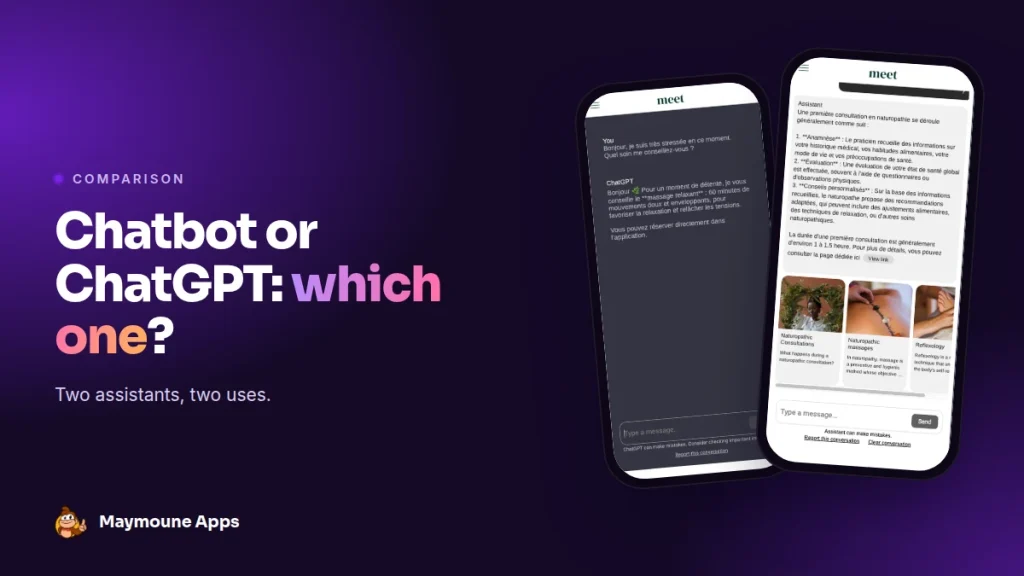
Two AI assistants can answer your customers in your app: the ChatGPT assistant and the chatbot on your content. One follows your instructions, the other reads your pages. Here’s how to choose, depending on your business.
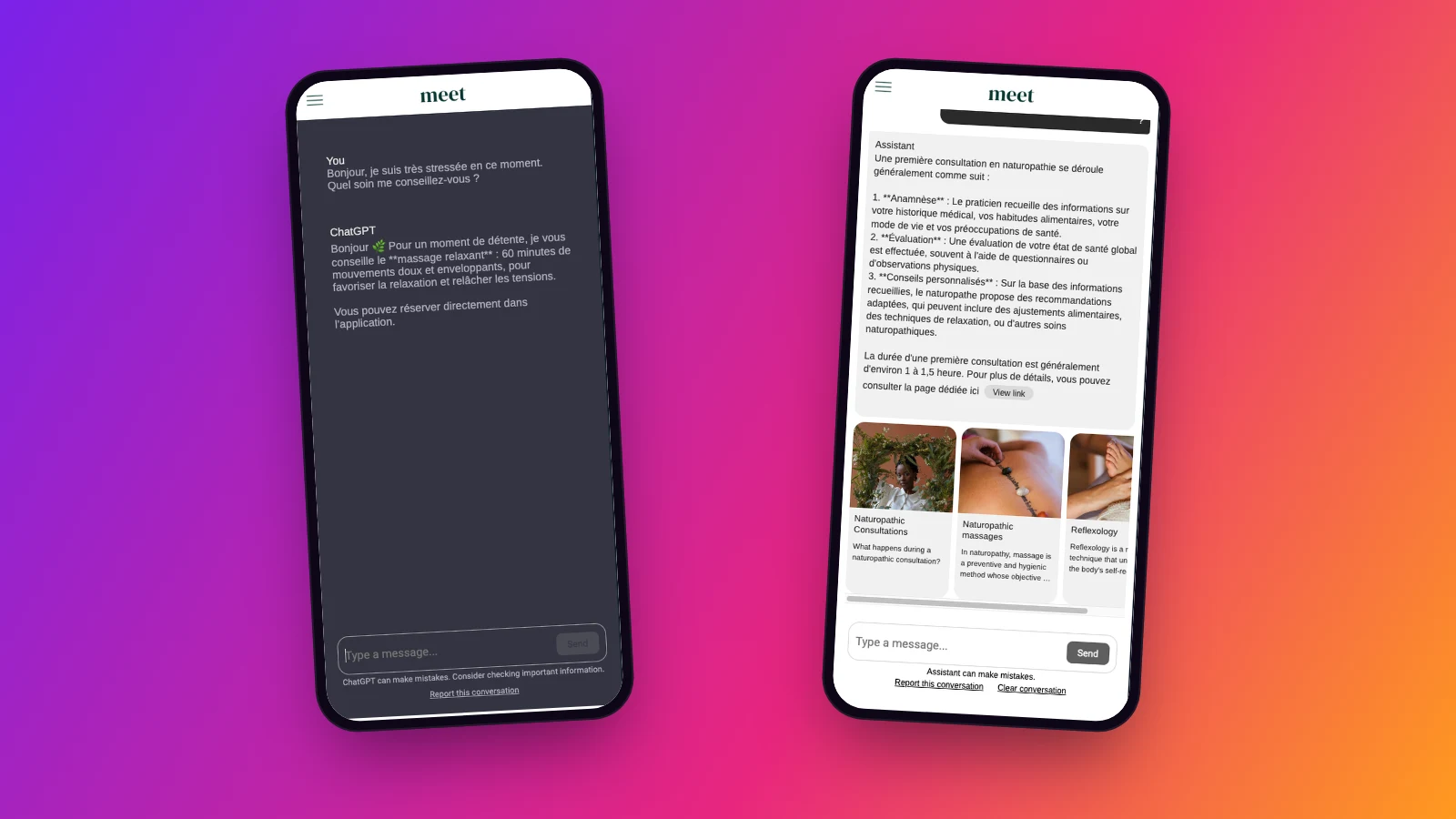
Both look alike on screen: a conversation area, a question, an answer. But they don’t work the same way, and they don’t do the same job. I show them side by side, with two real conversations in our demo.
The difference in one sentence
The ChatGPT assistant knows what you write in its instructions. The chatbot knows what’s published in your app, and keeps it up to date on its own.
The comparison
| ChatGPT assistant | Chatbot on your content | |
|---|---|---|
| Its source | Your written instructions | Your posts, events and places |
| Updates | You edit the instructions | Automatic with each new post |
| Links to your pages | No | Yes, with clickable cards |
| Subscribers only | No | Possible |
| Setup | Your OpenAI key | We activate it with you |
| Cost | Extension included, usage billed by OpenAI | Paid extension, 30 days to test it, free |
What they have in common
- They answer at any hour, even when you’re closed.
- They usually answer in the customer’s language.
- They take on your app’s colours and fonts.
- They remind users that AI can make mistakes, and each customer can report a conversation.
- They’re added as a section, which you place wherever you like in the menu.
In both cases, you stay in control: you decide what they say, and you can remove them from the menu at any time.
Choose the ChatGPT assistant if…
- You want an adviser who guides, reassures and suggests, with a very personal tone.
- Your key information fits in a few lines: hours, prices, offers, rules.
- You already have an OpenAI account, or you’re ready to open one.
It’s all covered in the article on the ChatGPT assistant.
Choose the chatbot if…
- You publish a lot: treatments, products, news, events, addresses.
- You want every answer to link to the right page in the app.
- You sell a subscription and want different answers for your subscribers.
It’s all covered in the article on the chatbot on your content. To activate it, contact us.
Why not both?
Both can live in the same app. The chatbot answers precise questions about your content, the ChatGPT assistant plays the adviser. Give them clear names in the menu, for example “Find information” and “Ask for advice”.
Three real-life examples
- A spa: the chatbot for the treatment menu and lengths, the ChatGPT assistant to suggest a ritual based on today’s mood.
- A tourist office: the chatbot for places and events, the assistant to build a tailor-made day.
- A store: the chatbot for product pages, the assistant to find a gift idea.
How much it costs
Your app stays on one of the three plans, detailed on the pricing page:
- Starter, €19 a month: your web app, installed from a link or a QR code.
- Ultra, €59 a month: the same, plus the iPhone, iPad and Android app on the stores.
- Ultra lifetime, €2,999: a one-time payment, with publishing on the App Store and Google Play included.
My advice: start with the ChatGPT assistant if your content is still light, then add the chatbot once your sections are well filled. Plan details are on the pricing page.
Maymoune Apps
AI that answers your customers, your way
Three plans, every feature included, no commitment.
✓ ChatGPT assistant included
✓ Chatbot on your content as an option
✓ Unlimited notifications
✓ Support included
Also worth reading: the MCP protocol made simple. Other questions are answered in the FAQ.
Frequently asked questions
What’s the difference between the chatbot and the ChatGPT assistant?
The ChatGPT assistant answers from the instructions you write. The chatbot answers from the content published in your app, and shows its sources.
Can both be used in the same app?
Yes. They can live side by side, each in its own section.
Which one updates itself?
The chatbot: every item published in the chosen sections is added automatically.
Which one is included in the plans?
The ChatGPT extension is included, with usage billed by OpenAI on your account. The chatbot is a paid extension, with 30 days to test it, free.
How much does the app cost?
€19 a month for the web app, €59 a month with the iPhone and Android apps, or €2,999 once and for all. Details are on the pricing page.
Up next
 News of Maymoune
 Getting your app discovered: store optimisation and Google search
Name, keywords, screenshots, reviews, QR code: how to get your app found on the App Store, Google Play and in Google’s results.
3 min read18 Oct 2026 News of Maymoune
 Making money with your app: 6 models that work for a business
Online sales, bookings, subscriptions, advertising, loyalty: the models that make an app genuinely profitable, and which one to choose for your business.
4 min read18 Oct 2026 News of Maymoune
 Agency, freelancer or no-code tool: how to choose to build your app
Price, timelines, maintenance, ownership: an honest comparison between an agency, a freelance developer and a no-code tool for building a mobile app.
4 min read17 Oct 2026